 Waterfalls-style bass in Serum.
Build the bass.Shape the movement.
Learn how to approach the punchy, moving bass character heard in James Hype's "Waterfalls" using Xfer Serum. This ODESA tutorial focuses on the sound-design decisions behind the style so you can shape your own version and use it creatively in a new production.
This independent educational tutorial is not affiliated with or endorsed by James Hype, the original release rights holders or Xfer Records.
The strength of this type of bass does not come from stacking dozens of effects. It comes from a controlled source sound, a short envelope, carefully shaped filter movement and enough saturation to make the result speak on smaller systems.
Use the short video above as the fast visual guide, then work through the principles below inside Serum. The aim is not to copy a commercial preset exactly - it is to understand why this style of bass feels tight, energetic and immediately recognisable.
What gives the bass its character?
A Waterfalls-style dance bass sits between a bass and a lead. It needs enough low-mid weight to drive the track, but it also needs a clear upper texture that remains audible beside drums, vocals and synths.
- A simple oscillator source that leaves room for filtering and distortion
- A short amplitude shape that keeps every note controlled
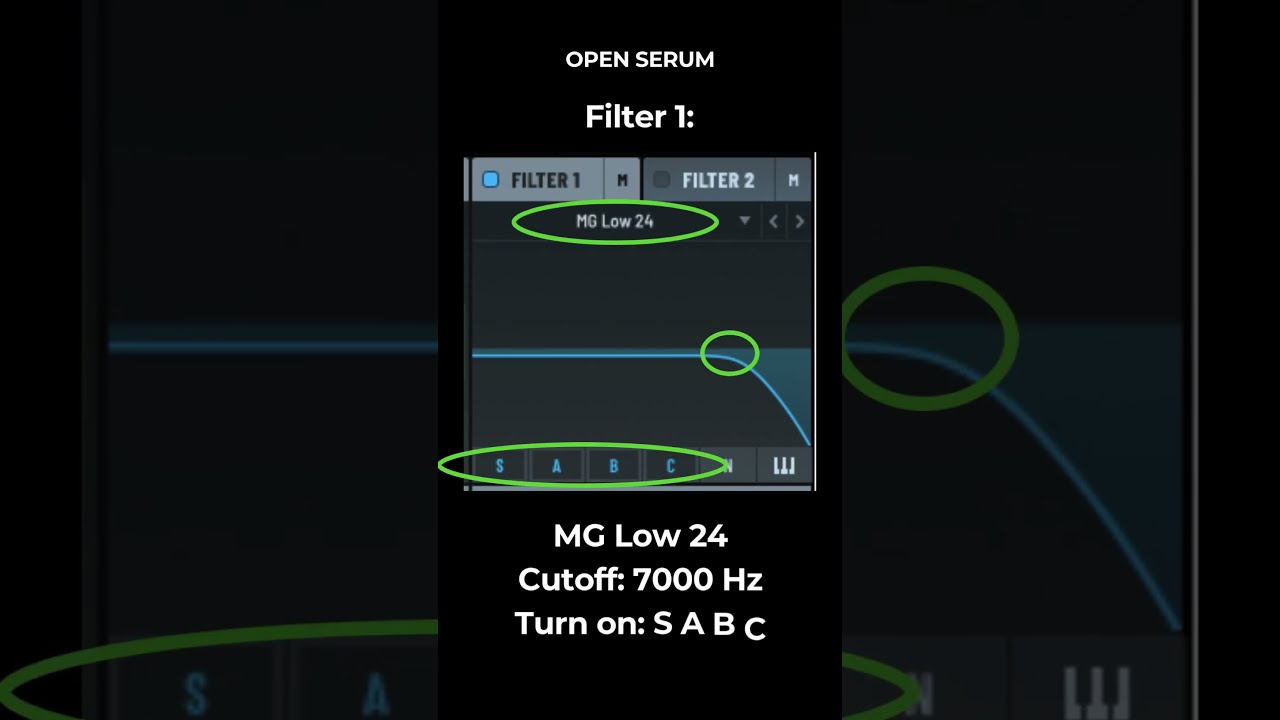
- Filter or wavetable movement that creates the vocal-like character
- Mono and glide behaviour for smooth movement between selected notes
- Saturation and compression for density rather than uncontrolled volume
How to build it in Serum
Start with a controlled oscillator
Begin with one oscillator and a relatively clean wavetable position. A saw-based or harmonically balanced source gives the filter useful material without making the patch crowded. Place it in the register that works with your track before adding extra layers.
Shape a short, confident envelope
Keep the attack fast so the sound arrives immediately. Use a controlled decay and sustain level to prevent notes from washing into one another. The release should be short enough for a tight pattern, but not so short that the tail clicks unnaturally.
Create the movement
Route an envelope or LFO to the filter cutoff, wavetable position or both. The modulation amount matters more than speed alone: too little sounds static, while too much can turn the patch into an exaggerated wobble. Adjust the shape while the actual bass pattern is playing.
Set mono, legato and glide
Enable mono mode when the part should behave as one continuous bass voice. Add a small amount of portamento and test overlapping MIDI notes. Glide is most effective as an occasional phrase detail, not something every note must use.
Add controlled saturation
Use Serum’s distortion to bring the upper harmonics forward. Increase the drive while matching the output level so louder is not mistaken for better. Multiband compression can add density, but keep the low end stable and avoid crushing the movement created earlier.
Fit the patch into the track
Use EQ to remove unnecessary sub information if a separate sub layer is present. Check the sound beside the kick rather than in solo, then adjust note length, filter movement and saturation until the bass feels connected to the groove.
Useful starting points
These are creative starting points rather than exact preset values. Adapt them to the key, tempo and arrangement of your own track.
Common problems
The bass sounds thin
Check the oscillator octave, filter position and note register before adding more effects. If the track needs deeper weight, use a separate clean sub layer instead of forcing every frequency into the main patch.
The movement is too extreme
Reduce the modulation amount before changing the LFO speed. A smaller movement range often sounds more controlled and musical.
The notes blur together
Shorten the MIDI notes or envelope release, then check whether portamento is active on notes that should remain separate.
The patch disappears in the mix
Listen to the midrange harmonics. Gentle saturation or a small filter adjustment may improve audibility more effectively than simply increasing the channel volume.
Frequently asked questions
Do I need Serum to follow this tutorial?
Serum makes the workflow straightforward, but the core ideas - oscillator choice, envelope shaping, filter modulation, glide and saturation - can be applied in other capable wavetable synthesizers.
Is this an exact James Hype preset?
No. This is an educational sound-design approach inspired by the bass character associated with "Waterfalls". It is intended to help you create an original version for your own music.
Should I add a separate sub bass?
Use one when the main patch lacks stable low-frequency weight or when you want independent control over the sub. Keep the sub clean, mono and arranged so it does not fight the kick.
Can this style work in speed garage?
Yes. Short notes, selective glide, rhythmic space and controlled low-end layering can make the approach work well in speed garage and other UK-influenced club styles.
Build your next idea.
Watch more ODESA production tutorials or download Free Sample Pack Vol. 1 for royalty-free drums, loops, vocals, FX, bass and melodic sounds.
0 comments:
Post a Comment